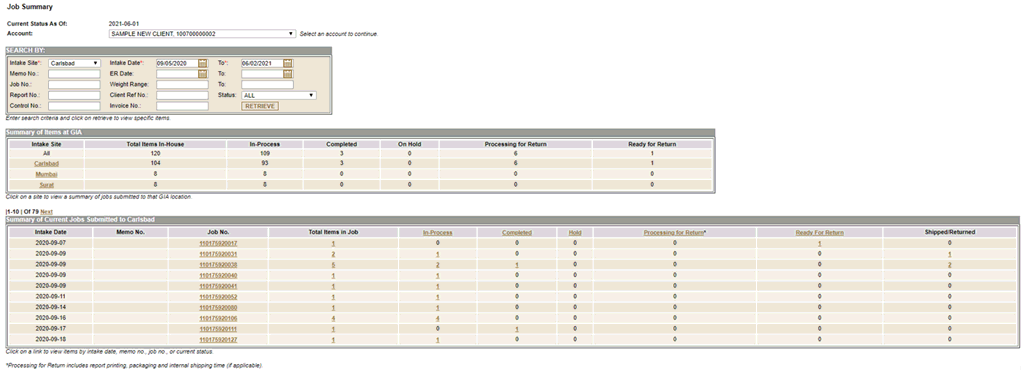
This is the initial page to query all items submitted to GIA for servicing. Results are updated every 15 minutes. To view items, select an account and then use either the Search By feature or use the links in the Summary of Items or Summary of Current Jobs tables.
Scroll down for more information.

The Account field displays the GIA accounts you have access to view.
- If you have access to only one GIA account, it is selected for you.
- If you have access to more than one GIA account, click the pull-down to select an account and continue.

To search for specific items submitted to GIA, first select an Intake Site then enter any additional parameters and click Retrieve.
- The Intake Date range defaults to the last 90 days. If you want to search for items submitted within a different date range, you may edit these fields.

This table displays a summary of all items currently at GIA, organized by location. The status of those items is summarized as follows:
- Total Items In-House: total number of items currently at GIA for servicing; this does not include items that have been shipped or returned to you.
- In-Process: total number of items at GIA that are in the process of being graded and/or identified.
- Completed: total number of items at GIA whose services have been completed; reports are not yet printed.
- On Hold: total number of items at GIA which you have placed on hold; GIA is awaiting your instruction to either request additional services or print reports.
- Printing: total number of items at GIA whose reports are currently being printed.
- Ready for Return: total number of items at GIA that have reports printed and are ready to be shipped or picked up
If you currently have items in more than one Laboratory location, click the location to view those jobs. If all items were submitted to one Laboratory location, these jobs are automatically displayed.

Summary of Current Jobs Submitted to <location>
This table displays all jobs with at least one item still at the selected GIA location.
- One Job is displayed per row.
- Results are sorted by Intake Date.
Click a link to view items within a Job.
- Click a Job Number or Memo Number to view all items in that job.
- Click a Status column title to view items in any Job with that status.
- Click a number total to view only those items.
- For example, clicking the number 12 in the Completed column will display only those 12 completed items in that Job.